The Coach in the Editor
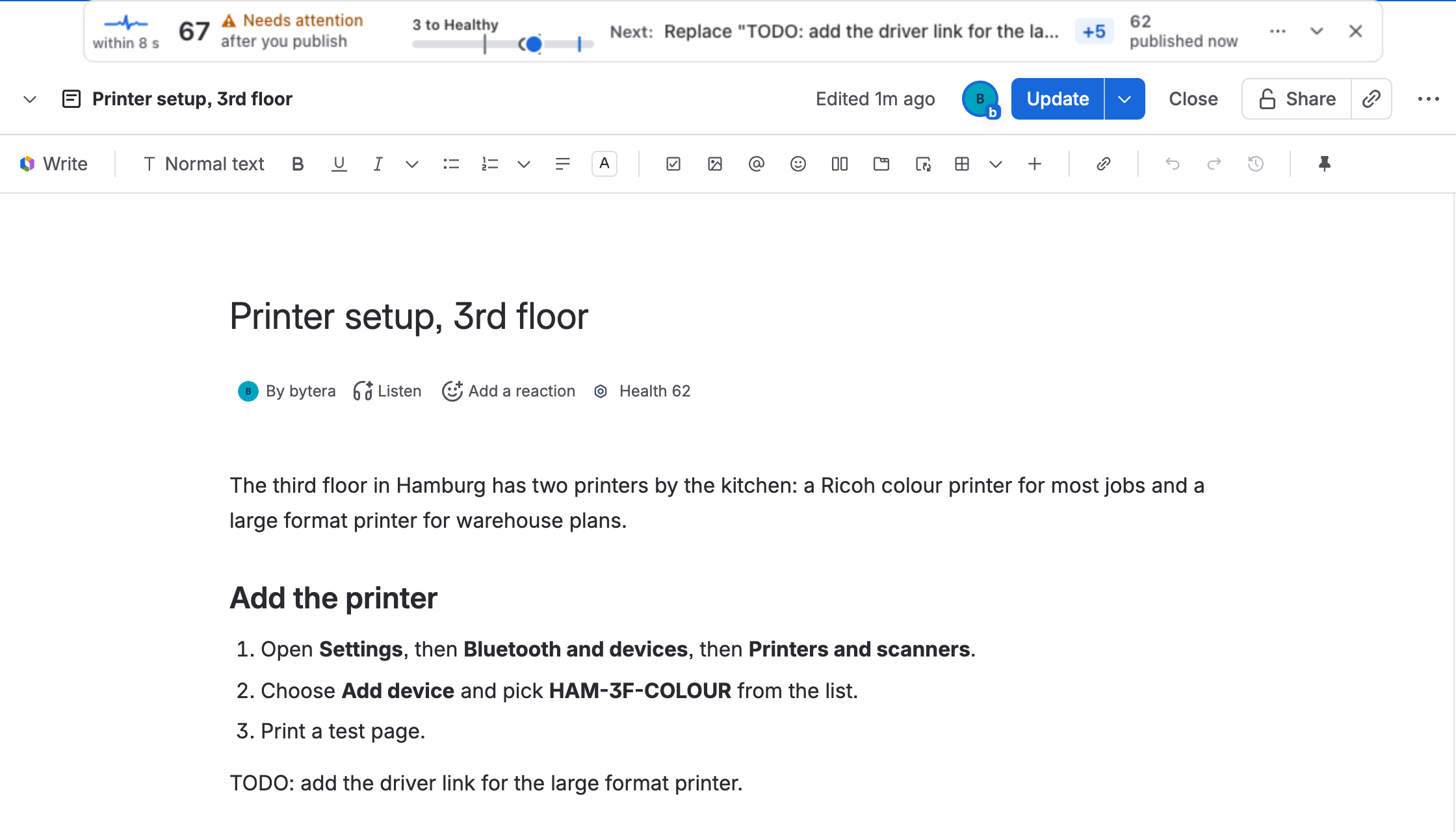
Most content tools tell you about a weak page after it is published, when nobody has the context to fix it. Pulse works while the page is open in the editor. One line above the page tells you the score the page will have after you publish, and the one step worth the most points.
Reading the line
Section titled “Reading the line”From left to right:
- The heartbeat and within 8 s: when Pulse checks your draft next. It checks every few seconds while you type and slows down when you stop.
- The score after you publish and its band: Healthy from 70, Needs attention from 40, Critical below 40.
- How far to Healthy, on a small scale: 3 to Healthy.
- Next: the one step worth the most points, with its points, for example Replace “TODO: add the driver link for the large format printer” +5. Steps marked Must fix come first: a placeholder left in, links that do not open, a missing title.
- Published now: the score of the page as it is published today.
Make the change and keep writing. At the next check of your draft, the line confirms the step and the points move into the score. You save nothing for Pulse: it reads your draft as you, the way Confluence shows it to you.
The whole list
Section titled “The whole list”Open the line (the arrow on its right) for the drawer:
- Do next, in order: every step, Must fix first, then the improvements that earn the most points. A placeholder is quoted so you can find it, with Copy.
- Changes when you publish: what publishing changes by itself, such as freshness.
- Context: the AI ready score after you publish, the page’s readers in the last 30 days, a similar page if Pulse found one, and what this session has changed so far.
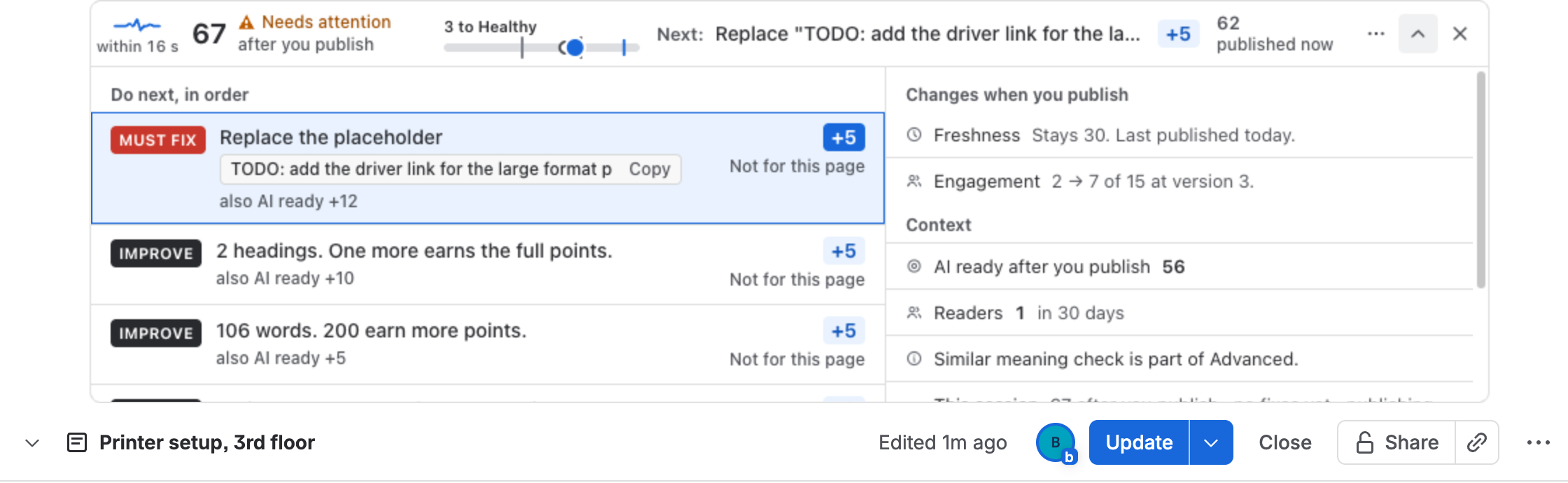
Not for this page on a step hides it for you on this page. It never raises the score, so the numbers stay honest.
When the page is Healthy
Section titled “When the page is Healthy”Once the page will be Healthy after you publish and no Must fix is open, Pulse stops proposing steps. The line says the rest is optional and how many points are left if you want them.

The receipt after you publish
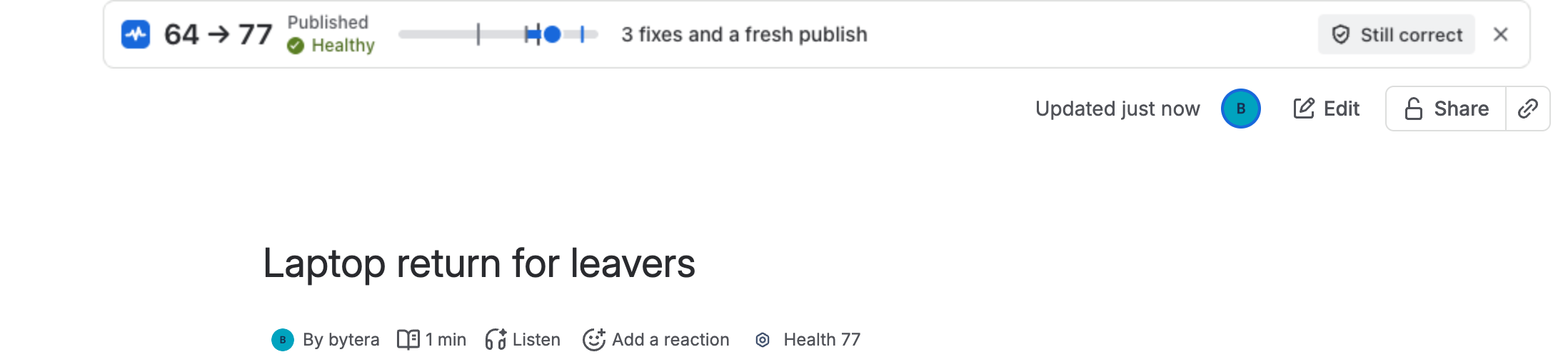
Section titled “The receipt after you publish”When you publish, the line on the page you see becomes a receipt: the score before and after, the band, and what changed. Still correct lets you confirm the page is right as it is, which sets its review date. See Page vitals.
A title that already exists
Section titled “A title that already exists”When you start a new page and give it a title, Pulse looks for pages with a similar title. If it finds some, the line says how many pages may already cover this, so you can update the page that exists instead of starting a second one. On the Advanced edition, when no title matches, Pulse also asks its similar meaning check, which finds pages on the same topic under other words. See Duplicate detection.
Live docs
Section titled “Live docs”Live docs have no publish step, so the line shows one number: the score of the doc as it is now. When the line scrolls out of view in a live doc, Pulse raises a small flag for the moments that matter: the doc becomes Healthy, a Must fix is cleared or added, or a duplicate title appears.
Your own setting
Section titled “Your own setting”Open the line’s menu (···):
- Close on this page hides the line until you next open the editor.
- Not for this page hides the current step for you.
- Your Pulse settings chooses when you see the coach: always, only on pages below Healthy, or off. The same setting is in Page vitals and in the header of For you, so you can always turn it back on.
Admins choose the default for the whole site, and a quiet rule keeps the coach from repeating itself on a page you keep closing. See Settings.
What the coach never does
Section titled “What the coach never does”- It never changes your page. The coach names the change; you make it.
- It never blocks a publish.
- It reads your draft as you, so it sees exactly what you can see.
- Page vitals: the same steps outside the editor.
- Content Health Score: where the points come from.